JS: Pass by Value vs Pass by Reference
Oct 22, 2025
Imagine..
A table containing data that you've stored in a local variable. The table contains a collection of data you just created from a create form. In this case, have you encountered a strange situation where every time you save the form to the table and reset the form, the data that's entered into the table is the data that was reset? You start to wonder, where does the data you entered from the create form go?
That's something that likely happens frequently in FE if you're asked to always delete the data in the create form after saving it to the table. The goal is simple: to allow users to add additional data (if any) and to provide a good and clean user experience by resetting the form. But why does this happen? Where does the data go?
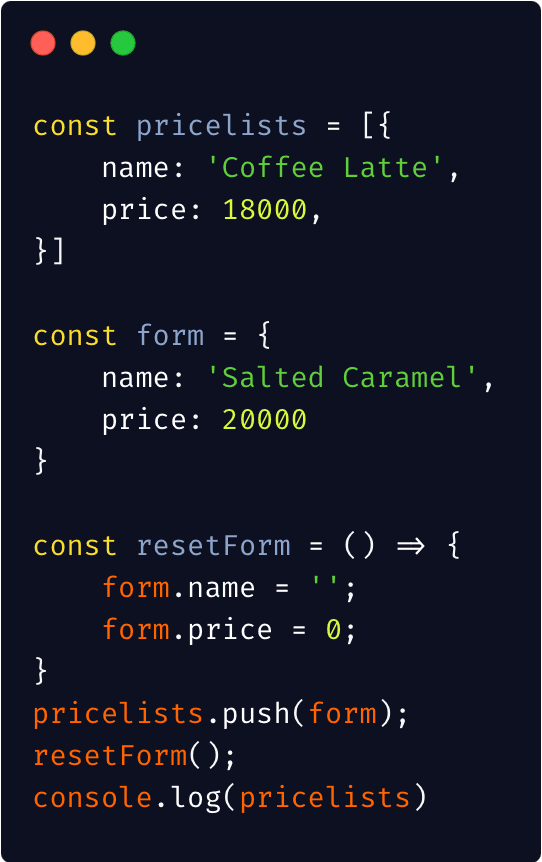
Take a quick look at the code above. What do you think the output of console.log(pricelists) is?
??
Oh no.
The printed data appears to be
This is an example of the technical description I explained earlier. However, if we look at resetForm(), it's executed after saving the data to the table. Why does the resulting code (console.log) appear to be running in reverse order?
WHY?
After much research, I discovered that this isn't because the code is executed in reverse order. Rather, it's because the nature of passing object data is different from other data types, such as text (strings), numbers, true/false (booleans), etc.
Primitive type
Data with primitive types (simple types with a single value) such as strings, numbers, booleans, null, undefined, etc., inherits its value. This means that if you duplicate data of this type, you copy its value. Therefore, the original and duplicated data will not conflict or affect each other.
Non-primitive type
This is different from non-primitive data types, such as objects, arrays, and functions. Because this type is much more complex, storing data not only values but also methods and properties. From the case we discussed earlier, it turns out the problem is with passing data. The object we saved to the array via pricelists.push(form) only stores the reference (memory address) of the form, not the value. So, if you duplicate an object's data and modify the first object, such as changing the value of an attribute, the data in the duplicated object will also change. This is because the system remembers that your second object is derived from the previous object's reference.
Now, our case where the data stored in the pricelist is actually empty is still relevant. It turns out the object we pushed into the pricelist references the form payload. Meanwhile, we later reset the form to the same reference. So the array automatically deletes its value according to the reset form command.
Solution
So what's the solution? Copy with the spread operator! (…)
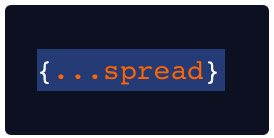
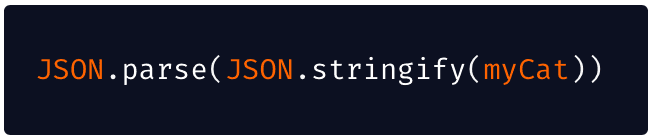
To duplicate an object so that it moves independently, copy it with the spread operator. This prevents data conflicts between the original and the duplicated data. However, the spread operator will only duplicate your data one level at a time, so if you have nested data, you'll need to spread it again to prevent it from inheriting data by reference. To perform nested copies without having to spread them continuously, you also have the option of duplicating objects or arrays using the built-in JavaScript methods JSON.parse() and JSON.stringify(). This simplifies inheritance of non-primitive data, allowing for nested copies.
Things I learned
Both primitive and non-primitive data types have different ways of passing data